Cisco Training Courses

Kurssit

Insoft on palvellut IT-yhteisöä Ciscon virallisella koulutustarjonnalla vuodesta 2010. Tältä sivulta löydät kaikki olennaiset tiedot Ciscon koulutuksesta.

Katso lisää Cisco Training Learning Partner
Cisco Learning Credits

Cisco Learning Credits

Cisco opintopisteet (CLC) ovat suoraan Ciscon kanssa lunastettuja prepaid-koulutusseteleitä, jotka helpottavat menestyksen suunnittelua ostaessasi Ciscon tuotteita ja palveluita.

Katso lisää Cisco Training Learning Partner
Cisco Continuing Education

Cisco Continuing Education

Cisco täydennyskoulutusohjelma tarjoaa kaikille aktiivisille sertifioinnin haltijoille joustavia vaihtoehtoja uudelleensertifiointiin suorittamalla erilaisia kelvollisia koulutuskohteita.

Katso lisää Cisco Training Learning Partner
Cisco U Digital Learning

Cisco Digital Learning

Sertifioidut työntekijät ovat ARVOSTETTUJA omaisuuseriä. Tutustu Ciscon valtuutettuun digitaaliseen oppimiskirjastoon ja kouluta itseäsi tallennettujen istuntojen avulla.

Katso lisää Cisco Training Learning Partner
Cisco Business Enablement

Cisco Business Enablement

Cisco Business Enablement Partner Program keskittyy Cisco Channel Partnersin ja asiakkaiden liiketoimintataitojen terävöittämiseen.

Katso lisää Cisco Training Learning Partner
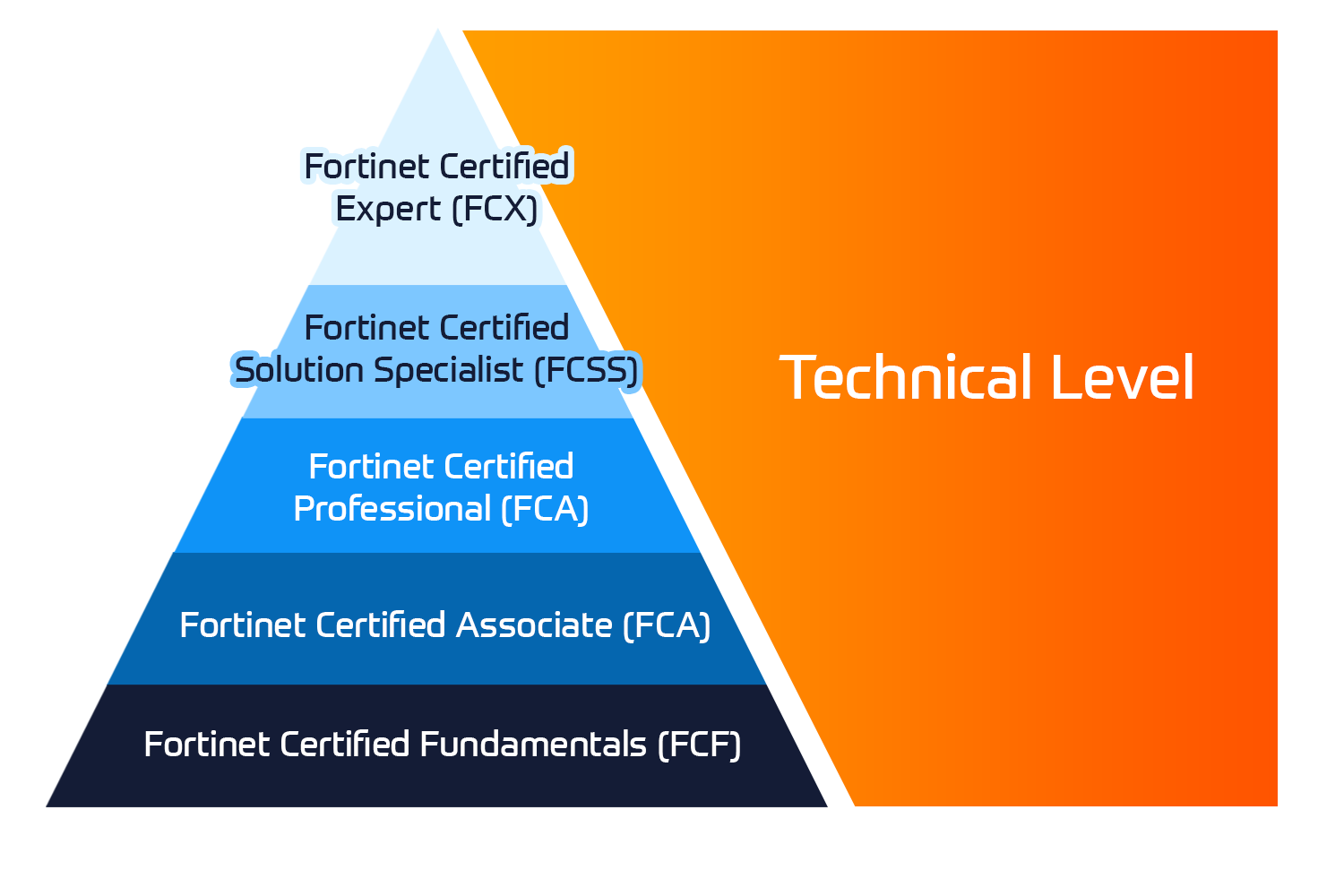
Fortinet Certification Training

Kurssit

Insoft Services on auktorisoitu Fortinet-kouluttaja useassa Euroopan maassa.

Katso lisää Fortinet Premier Authorized Training Center
Fortinet Training Courses

ATC Status

Tarkista ATC-tilamme valituissa Euroopan maissa.

Katso lisää Fortinet Premier Authorized Training Center
AWS

Kurssit

Koulutus sisältää omatoimisia laboratorioita käytännön AWS-harjoitteluun tosielämän skenaarioissa, jolloin voit oppia omaan tahtiisi, luokassa, töissä tai verkossa.

Katso lisää AWS
Extreme Networks Training Partner

Kurssit

Extreme Networks Technical Trainingin kehitys tarjoaa kattavan progressiivisen polun associate-akkreditoinnista ammatilliseen akkreditointiin.

Katso lisää Extreme Networks Training Partner
Extreme Networks Training Partner

ATP-akkreditointi

Valtuutettuna koulutuskumppanina (ATP) Insoft Services varmistaa, että saat korkeimman saatavilla olevan koulutuksen.

Katso lisää Extreme Networks Training Partner
Insoft Services

Tiimimme

Koulutusvalikoimaamme kuuluu laaja valikoima IT-koulutusta IP-palveluntarjoajilta, mukaan lukien Cisco, Extreme Networks, Fortinet, Microsoft, muutamia mainitakseni, EMEA-alueella.

Katso lisää Insoft Services

Microsoft Power BI Data Analyst (PL-300T00-A)

Ota yhteyttä

Voit olla meihin yhteydessä ja tiedustella koulutuksistamme täydentämällä yhteystietosi ja koulutuksen nimen oheen.

Tietosuojalauseke ja yksityisyys

Suostun vastaanottamaan sähköpostiviestejä ja/tai puheluita Insoft Services Oy: n tuotteista ja palveluista.
Hyväksyn, että tietojani kerätään ja käsitellään Insoft Servicesin tietosuojakäytännössä kuvatulla tavalla.

Close

Microsoft Power BI Data Analyst (PL-300T00-A)

VARAA NYT
Microsoft Power BI Data Analyst (PL-300T00-A)
Kesto
3 päivää
Toimitus
(Online ja paikan päällä)
Hinta
Hinta pyydettäessä

This course covers the various methods and best practices that are in line with business and technical requirements for modeling, visualizing, and analyzing data with Power BI. The course will show how to access and process data from a range of data sources including both relational and non-relational sources. Finally, this course will also discuss how to manage and deploy reports and dashboards for sharing and content distribution.

Associated Certification:

  • Microsoft Certified: Power BI Data Analyst Associate

Get started with Microsoft data analytics

Businesses need data analysis more than ever. In this learning path, you will learn about the life and journey of a data analyst, the skills, tasks, and processes they go through in order to tell a story with data so trusted business decisions can be made. You will learn how the suite of Power BI tools and services are used by a data analyst to tell a compelling story through reports and dashboards, and the need for true BI in the enterprise.

  • Discover data analysis
  • Get started building with Power BI

Prepare data for analysis with Power BI

You’ll learn how to use Power Query to extract data from different data sources, choose a storage mode, and connectivity type. You’ll also learn to profile, clean, and load data into Power BI before you model your data.

  • Get data in Power BI
  • Clean, transform, and load data in Power BI

Model data with Power BI

Learn what a Power BI semantic model is, which data loading approach to use, and how to build out your semantic model to get the insights you need.

  • Describe Power BI Desktop models
  • Choose a Power BI model framework
  • Design a semantic model in Power BI
  • Write DAX formulas for Power BI Desktop models
  • Add measures to Power BI Desktop models
  • Add calculated tables and columns to Power BI Desktop models
  • Use DAX time intelligence functions in Power BI Desktop models
  • Optimize a model for performance in Power BI
  • Enforce Power BI model security

Build Power BI visuals and reports

Turn data into interactive, actionable insights with Power BI Desktop visuals and reports.

  • Scope report design requirements
  • Design Power BI reports
  • Configure Power BI report filters
  • Enhance Power BI report designs for the user experience
  • Perform analytics in Power BI
  • Create paginated reports

Manage workspaces and datasets in Power BI

In this Learning Path, you’ll learn how to publish Power BI reports to the Power BI service. You’ll also learn how to create workspaces, manage related items, and data refreshes for up-to-date reports. Additionally, implement row-level security to restrict user access to relevant data without the need for multiple reports.

  • Create and manage workspaces in Power BI
  • Manage semantic models in Power BI
  • Create dashboards in Power BI
  • Implement row-level security

The audience for this course are data professionals and business intelligence professionals who want to learn how to accurately perform data analysis using Power BI. This course is also targeted toward those individuals who develop reports that visualize data from the data platform technologies that exist on both in the cloud and on-premises.

This course covers the various methods and best practices that are in line with business and technical requirements for modeling, visualizing, and analyzing data with Power BI. The course will show how to access and process data from a range of data sources including both relational and non-relational sources. Finally, this course will also discuss how to manage and deploy reports and dashboards for sharing and content distribution.

Associated Certification:

  • Microsoft Certified: Power BI Data Analyst Associate

Get started with Microsoft data analytics

Businesses need data analysis more than ever. In this learning path, you will learn about the life and journey of a data analyst, the skills, tasks, and processes they go through in order to tell a story with data so trusted business decisions can be made. You will learn how the suite of Power BI tools and services are used by a data analyst to tell a compelling story through reports and dashboards, and the need for true BI in the enterprise.

  • Discover data analysis
  • Get started building with Power BI

Prepare data for analysis with Power BI

You’ll learn how to use Power Query to extract data from different data sources, choose a storage mode, and connectivity type. You’ll also learn to profile, clean, and load data into Power BI before you model your data.

  • Get data in Power BI
  • Clean, transform, and load data in Power BI

Model data with Power BI

Learn what a Power BI semantic model is, which data loading approach to use, and how to build out your semantic model to get the insights you need.

  • Describe Power BI Desktop models
  • Choose a Power BI model framework
  • Design a semantic model in Power BI
  • Write DAX formulas for Power BI Desktop models
  • Add measures to Power BI Desktop models
  • Add calculated tables and columns to Power BI Desktop models
  • Use DAX time intelligence functions in Power BI Desktop models
  • Optimize a model for performance in Power BI
  • Enforce Power BI model security

Build Power BI visuals and reports

Turn data into interactive, actionable insights with Power BI Desktop visuals and reports.

  • Scope report design requirements
  • Design Power BI reports
  • Configure Power BI report filters
  • Enhance Power BI report designs for the user experience
  • Perform analytics in Power BI
  • Create paginated reports

Manage workspaces and datasets in Power BI

In this Learning Path, you’ll learn how to publish Power BI reports to the Power BI service. You’ll also learn how to create workspaces, manage related items, and data refreshes for up-to-date reports. Additionally, implement row-level security to restrict user access to relevant data without the need for multiple reports.

  • Create and manage workspaces in Power BI
  • Manage semantic models in Power BI
  • Create dashboards in Power BI
  • Implement row-level security

The audience for this course are data professionals and business intelligence professionals who want to learn how to accurately perform data analysis using Power BI. This course is also targeted toward those individuals who develop reports that visualize data from the data platform technologies that exist on both in the cloud and on-premises.